Document redaction for Mac and WindowsEverything but who.
Remove selected personal details from your documents. Nothing leaves your device.
- No upload
- No account
- Works offline
- Open weights
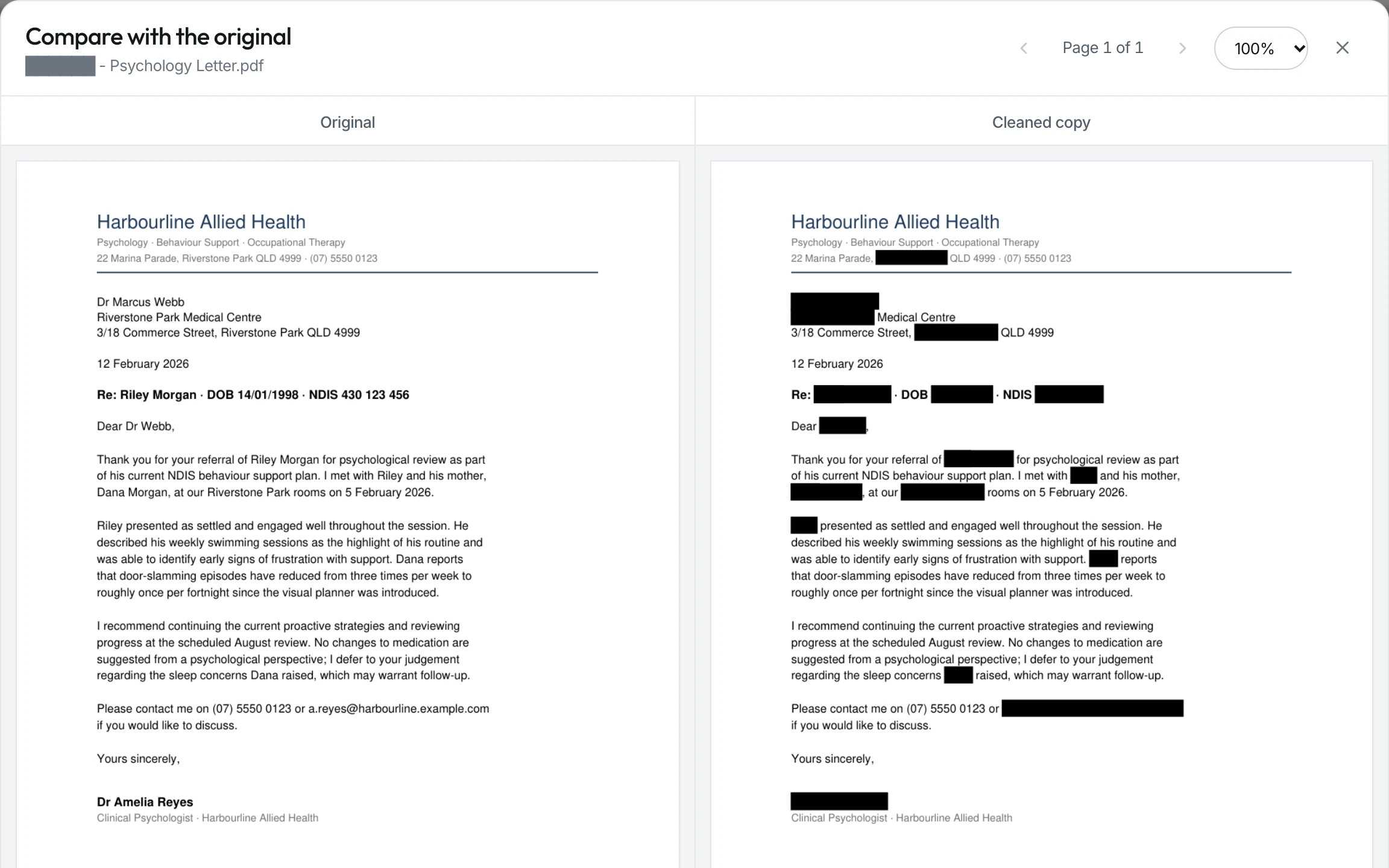
See it work
One case, start to finish, in three minutes.
Recorded in the app with a fictional case. Every name, number and address you see is invented.
What it is
Give it a document. Get back a clean copy.
nemodocs is a document redaction app you install on your device. It finds personal and sensitive details and takes them out.
It works on Word files, PDFs, spreadsheets and plain text, and reads scans and photographed pages too.
Your original is never touched.
- Names
- Dates of birth
- Addresses
- Phone numbers
- Emails
- Account numbers
- Case references
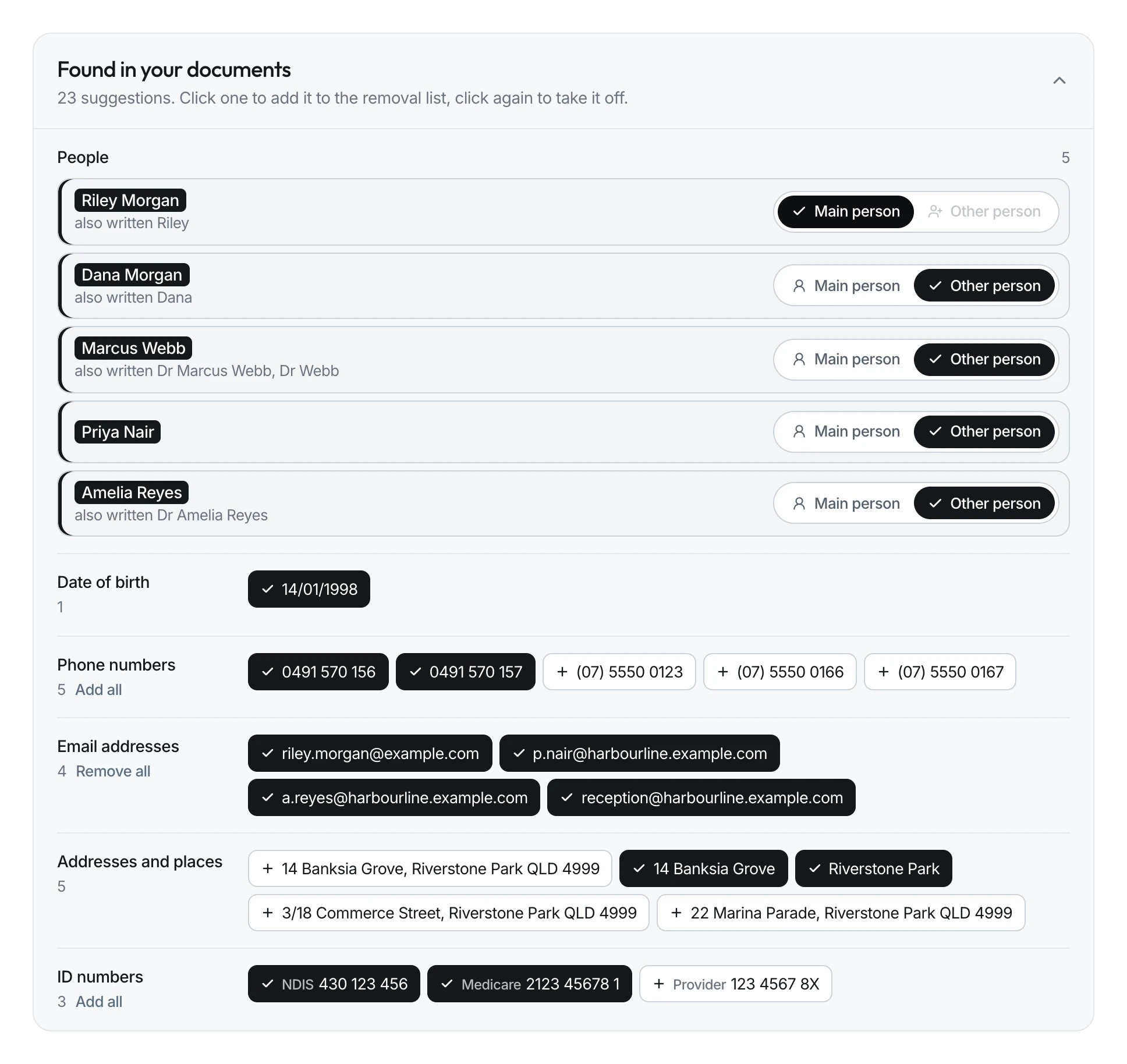
How to use it
Four steps, start to finish.
- 01
Add your files
Drag in one file or a whole folder. Click Scan for details.
- 02
Confirm what to remove
It shows you what it found, grouped by person. Click what to remove, and add anything it missed.
- 03
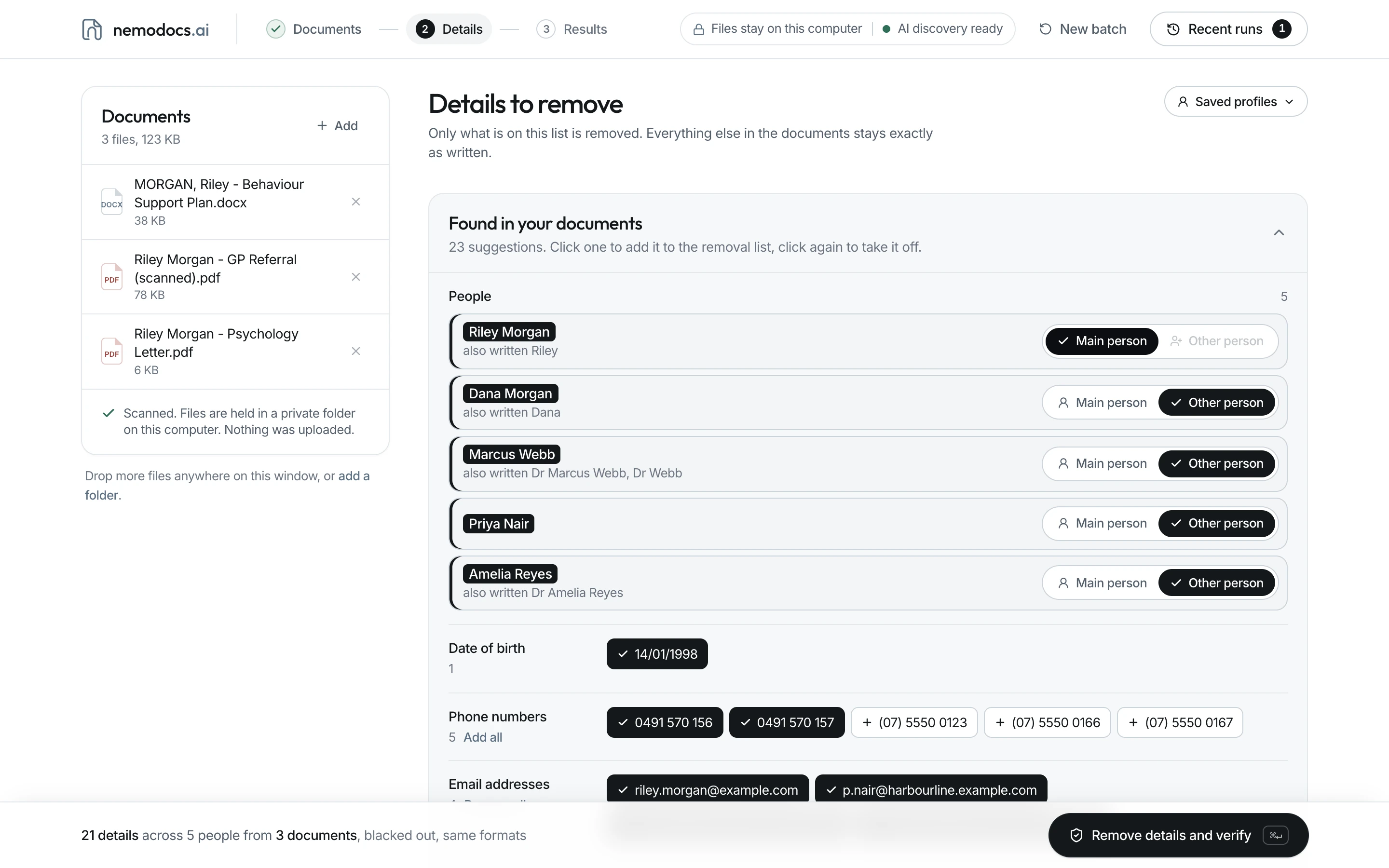
Remove and verify
Checks look for the details you selected. Any remaining matches or incomplete checks are flagged.
- 04
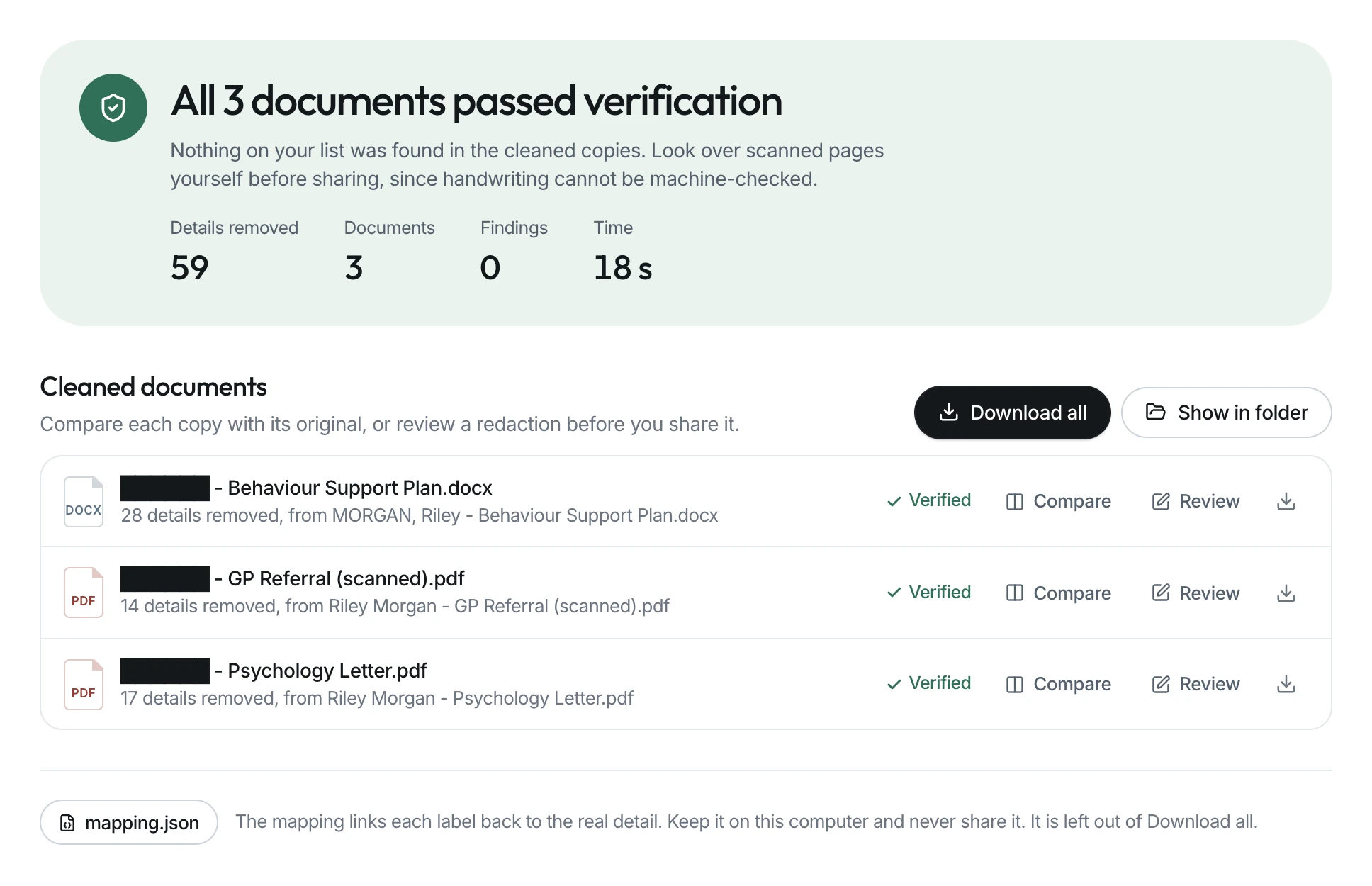
Check it yourself
Compare the original and the clean copy side by side. Edit any redaction by hand.
Processing time depends on file size, scan quality and your computer.
On-device AI
Your document never leaves your device.
This is the part people ask about first, so here it is plainly. Your file is never sent to a server. There is no upload, no account and no cloud.
A large model, in a data centre
Your document leaves your device.
- Your document
- Uploaded over the internet
- Read on someone else’s servers
- Results sent back to you
Your document is now on a computer you do not control.
A small model, on your device
Your document stays where it is.
- Your document
- Read on your own hardware
- Results stay with you
Your document never left.
The AI comes to your file. Your file goes nowhere.
The core engine uses the details you confirm to redact your files. Optional AI discovery suggests additional people and details for you to review. Both run on your computer, without sending document content to a service.
AI discovery needs a separate, one-time download of its software and open model weights. After setup it can run offline. If it is unavailable, the app tells you and the core redaction workflow remains available.
What this means for you
- Document processing stays on your computer.
- No third party sees your data, including us.
- Nothing is used to train any model.
- Runs, originals and saved details stay in a local folder you control.
- Core redaction works offline. Optional AI discovery needs a one-time download.
“Turn your Wi-Fi off. nemodocs still works.”
Why it is different
What most redaction tools miss.
- It checks its own work
- nemodocs re-reads the finished file through a separate verification process, including OCR where supported. Remaining matches, processing errors and incomplete checks are flagged so you can review them before sharing.
- It removes a person, not just patterns
- Confirm a person’s details once. nemodocs looks for those details and common variations across your batch, including document metadata and filenames.
- Your everyday formats, together
- Word files, PDFs, scans, spreadsheets, plain text. One file or a whole folder. You do not need a different tool for each.
- It reads scans
- OCR reads text on scanned PDF pages and supported embedded images. Matches are burned into the output. Handwriting and poor scans still need a careful visual check.
- You decide what to remove
- Review scan suggestions, add missing details and choose optional pattern matching. The app removes the details you approve; it does not assume a scan found everything.
- You stay in control
- Review PDF and Word redactions in the app, restore a selection from the retained original, or add more. Downloaded redactions cannot be undone inside the output file.
Who it is for
Anyone who has to share a document, but not what is sensitive inside it.
AI tools are useful. Give them the clean copy, not the original.
Built for teams that handle sensitive files every day. Disability and NDIS providers, legal, healthcare, finance, consultants.
- Reports going to a client
- Case notes going into an AI tool
- Files for a researcher
- An auditor
- A lawyer
- A board pack
- A training deck
Questions
The things people ask.
Where does my document go?
Document processing happens on your computer. Originals, outputs, saved profiles and run records stay in a local app folder until you delete them. They are not uploaded to our website.
How does local processing protect my documents?
Scanning, redaction and verification run on your hardware. You do not send the original document to a cloud service to use nemodocs.
You decide what to remove and review the result before sharing it. Optional AI discovery suggests more details locally, but it does not replace your review.
Do I need an internet connection?
Core redaction works offline after installation. Optional AI discovery needs a separate initial download of software and model weights; once installed, it runs locally too.
What files does it handle?
DOCX, PDF, XLSX, TXT, Markdown and CSV. Scanned pages are supported inside PDFs, and supported images embedded in documents are checked with OCR. Standalone photographs should be placed in a PDF first.
Can I use nemodocs with ChatGPT or Claude?
You can prepare a redacted copy for an AI tool. First review the verification result, inspect the output and consider whether the remaining context could still identify someone. Share only the reviewed output, never your originals or mapping file.
Is anything used to train a model?
The app does not upload your documents or use them to train models. It keeps working files and profiles locally until you delete them. Information submitted through this website’s demo form is sent to us so we can reply, as explained in the privacy policy.
Do I need an account?
No. Once nemodocs is installed you open a document and go. There is nothing to set up and nothing to sign in to.
What if it removes too much?
Use the PDF or Word redaction editor to restore a selection from the retained original, then apply and verify again. The compare view helps you check the result. For other formats, adjust your removal list and run again.
Can the redacted text be recovered?
Applied redactions remove matching content from the output, rather than placing a removable overlay on top. Your retained original and local mapping file still contain sensitive information. Keep those private and check the verification report before sharing an output.
Is this the same as de-identification or anonymisation?
They are related, but not interchangeable. Redaction removes selected information. De-identification also needs a judgement about what remains: a rare event, location or combination of facts may still identify someone. nemodocs helps remove direct identifiers; it cannot guarantee anonymity.
How do I get nemodocs?
Email us or book a demo. There is no checkout on this site. We set each organisation up ourselves, so tell us about your work and the documents you handle and we will take it from there.
We will walk you through what the app does, let you try it on your own files, and put an agreement in place before anything is installed for your team.
Book a demo
See it work, in 15 minutes.
Tell us a little about your work and we will set up a quick 15 minute demo. We set each organisation up directly, and we will take it from there.
Prefer email? Write to hello@nemodocs.ai.
Available for Apple silicon Macs and 64-bit Windows PCs. We will confirm compatibility during setup.